عربي
عربي

 English
 عربي
عربي

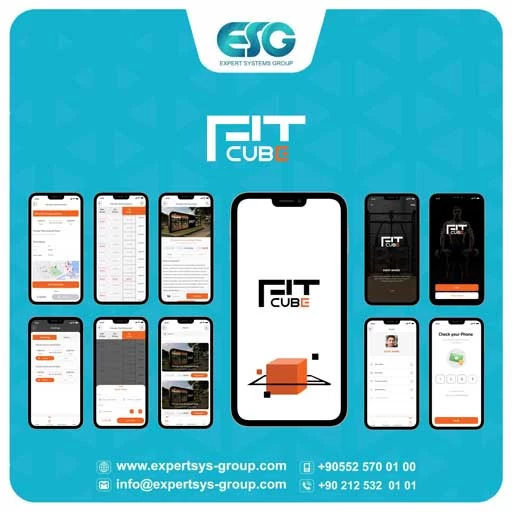
Fit cube
FIT CUBE app that secures gym access reservations and provides a convenient way for customers to schedule a specific time and date to visit
Mobile Applications
Office Applications Mobile Applications web design and developmentAbout the project
FIT CUBE app that secures gym access reservations and provides a convenient way for customers to schedule a specific time and date to visit
Below is a detailed explanation of how the application works
1. Downloading the App and Creating an Account:
- The customer starts by downloading the application on their mobile phone from the approved app store.
- Then, the customer creates a new account by providing their personal information, such as name, phone number, or email, and creating a password.
2. Booking Entry:
- The customer logs into the application using the account credentials they created.
- After logging in, the customer can select a specific date and time to visit the gym, the nearest to him.
- The customer can also specify the number of people they want to enter the gym with.
3. Electronic Payment:
- After selecting the date, time, and number of people, available payment options are displayed.
- The customer can choose electronic payment using available payment cards, such as credit or debit cards.
4. Reservation Confirmation:
- After successful payment, the reservation is confirmed through a confirmation message sent to the customer via the application or email.
- The customer's entry code is included in the confirmation message, which they use to enter the gym at the specified time, which is their own barcode.
5. Entering the Gym:
- When the customer arrives at the gym at the specified time,
- And enters the gym using the barcode sent to him, where there is a device to read the code, and before its time runs out, the application sends a notification that his designated playtime has ended.
By using the gym entry booking application, customers can avoid long waits in lines and ensure entry into the gym at the scheduled time, providing them with a comfortable and seamless experience for exercising.
Client
Fit cube
Project area
Book a gym
Service
Mobile Applications
Demo links
Result
.webp)
.webp)
.webp)
.webp)
.webp)
.webp)

Our Projects
Discover more











Blog Update
Blog update sub title
.webp)